
You can identify the three types of piece.
Yellow centre up, white down. Choose a front face and keep it facing you.
1. Name the faces as you hold the cube
| Letter | Face to turn |
|---|---|
| U | Up: the top face |
| D | Down: the bottom face |
| F | Front — the face towards you |
| B | Back: the face away from you |
| R | Right |
| L | Left |
These letters describe positions, not colours. If you rotate the whole cube, a different colour may become F. During an algorithm, keep your front fixed unless a whole-cube rotation is explicitly written.
2. Read the direction
Imagine looking straight at the face named by the letter. A plain letter means a 90° clockwise turn. An apostrophe means a 90° anticlockwise turn. A 2 means a 180° turn in either direction.
Rturns the right face clockwise when viewed from the right.R'turns the right face back the other way.U2turns the top face by half a turn.
Turns of the bottom and back faces often look reversed from the front. To judge clockwise, look directly at the face you are turning.
3. Read left to right
R U R' U' means four separate turns. Turn the right face clockwise, the top face clockwise, the right face anticlockwise and the top face anticlockwise. Finish one move before starting the next.
To undo a sequence, reverse its order and invert each move. For those four turns, the inverse sequence is U R U' R'. Changing the apostrophes in place only inverts the individual moves and leaves the order unchanged.
4. Match the demonstration
The next-move caption tells you which face to turn and in which direction. Advance one move, perform it on your cube and compare. Dragging the on-screen cube only changes your viewing angle and leaves your place in the sequence unchanged.
Watch, then try
Work through an example
Start by going through the moves one at a time. The prepared example shows a specific action. Use the lesson’s setup instructions to recognise when to apply it to your own scramble.
Watch one worked example
Practise on this scrambled cube. R followed by R′ cancels out, and performing U2 twice also returns the cube to its starting position. After all four moves, the cube is back in the same scramble.
Starting grip. Yellow up · blue at the front · red on the right. Follow any written instructions for rotating the whole cube.
0 / 4
Loading 3D cube…
Prepared starting position · 0 / 4 moves
Use Next move to follow the sequence.
Drag to inspect other faces. Use the arrow keys to rotate the view when the cube has focus.
Copy this exact example on your own cube
Start with a solved 3×3 with yellow facing up and blue facing front. Apply the setup moves below from left to right to create the example’s starting position. Keep this example separate from the scramble you are solving as you work through the course.
R U R' F2 D L2 B U2Then follow the lesson sequence. If your cube’s colour scheme differs, match the piece relationships using your own colours.
Compare the starting position and the result
Drag each cube to inspect its other faces.
Explain it to yourself
Check your understanding
Now use your own cube
Your turn
Perform R, then undo it with R′. Do the same with U and F. Finally, perform U2 twice. Before each move, say which face turns and in which direction.
Open a 3×3 Digital Cube for practiceOpens in a new tab so you can refer to this lesson while you practise. Check for yourself whether you’ve met the lesson goal. The Digital Cube does not grade your work.
If you get stuck
My R turn looks anticlockwise from the front.
Look directly at the right face to judge the direction of the turn. What looks clockwise from the front can differ from what looks clockwise from the right.
Before moving on
Check your result
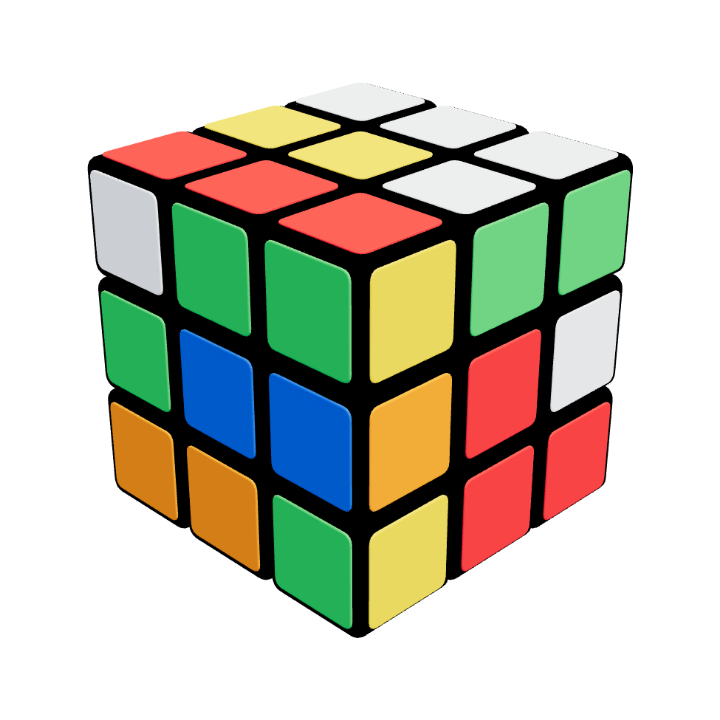
Preparation · no solving yet
Return to the same scramble
Each move is followed by its inverse, so the cube returns to the same scramble. You are practising turn notation here. Solving begins in the 3×3 Beginner course.
Confirm these on your cube. Watching the animation alone does not complete the lesson.
Tick each item once you can do it yourself.